



Electric underfloor heating thermostat settings: floor probe, air mode and limits
Every setting that matters on a Heatmiser neoStat-e or Slimline-E electric floor thermostat: sensor modes, floor limits, switching differential, optimum start, error codes and the electrical rules.
Short answer: On an electric underfloor heating thermostat, always connect the floor probe, then choose the sensor mode: air plus floor for most rooms, so the room temperature is controlled and the floor is capped, or floor only for a warm tiled floor in a bathroom. Set the floor limit to the flooring maker's maximum, such as 27°C for some vinyl. The Heatmiser neoStat-e allows 20 to 45°C with a 28°C default, and the Slimline-E defaults to 27°C. Leave the switching differential at 1°C, and turn on optimum start if you want the room warm at a set time.
An electric floor heating thermostat does two jobs. It controls the comfort of the room, and it protects the floor from overheating, because the heating cable sits only millimetres below the finish. Most of the settings that matter are buried in a setup menu, and the factory defaults are not right for every floor.
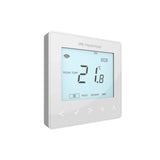
This guide goes through each setting on the Heatmiser neoStat-e and Slimline-E, the two 16A electric floor thermostats MaxHeatUFH sells, using Heatmiser's own manuals and datasheets. It covers sensor modes, floor limits, the switching differential, optimum start, error codes and the electrical rules. For why the thermostat must be rated 16A, see electric UFH thermostats and 16A loads.
Which settings matter on an electric UFH thermostat?
Four settings matter most: sensor mode, floor limit, switching differential and optimum start. Here are the ranges and defaults Heatmiser gives.
| Setting | neoStat-e | Slimline-E |
|---|---|---|
| Switching current | 16A | 16A |
| Sensor modes | Built-in air, remote air, floor only, built-in plus floor, remote air plus floor | Built-in, remote air, floor only, built-in plus floor, remote air plus floor |
| Floor limit | 20 to 45°C, default 28°C | 20 to 45°C, default 27°C |
| Switching differential | 0.5, 1, 2 or 3°C, default 1°C | 1 to 3°C, default 1°C |
| Optimum start | 0 to 5 hours, default off | 0 to 3 hours, default off |
| Frost protection | 7 to 17°C, default 12°C | 7 to 17°C, default 12°C |
| Output delay | 0 to 15 minutes, default 0 | 0 to 15 minutes, default 0 |
| Up/down limit | 0 to 10°C, default 0 | 0 to 10°C, default 0 |
| Program modes | Non-programmable, weekday/weekend, 7-day, 24-hour | Non-programmable, 5/2 day, 7-day |
| App control | Yes, through a neoHub | No |
| Floor probe | Included | Included |
The neoStat-e is the app-controlled model. The Slimline-E is the button-only model. Both fit a standard 35mm back box.
Which sensor mode should I use?
Use built-in air plus floor in most living spaces, and floor only where you want a warm floor rather than a set room temperature. Never run an electric floor on air sensing alone.
| neoStat-e mode | What it controls | Use it for |
|---|---|---|
| 00 Built-in air (default) | Room air only | Not for electric floors on its own |
| 01 Remote air | A remote air sensor | Thermostat outside the room, such as a bathroom |
| 02 Floor only | Floor temperature | Tiled bathrooms and kitchens where you want a warm floor |
| 03 Built-in air plus floor | Room air, capped by the floor limit | Most rooms, and wood, laminate or vinyl floors |
| 04 Remote air plus floor | Remote air, capped by the floor limit | Bathrooms with the thermostat outside |
Note that the factory default is built-in air only. On an electric floor you need to change it. Heatmiser's FAQ says that for electric underfloor heating, a floor probe must be fitted. BEAMA's controls guide says electric floor heating thermostats should have air and floor sensing that can be used individually or together.
In air plus floor mode, the thermostat heats until the room reaches its set point, but cuts the heat if the floor reaches the limit first. In floor only mode, the number you set is the floor temperature, not the room temperature. Heatmiser's FAQ gives the setup step for floor only on a neoStat: set the small number to 06 and the large number to 02. If no probe is connected, the thermostat shows E1.
A remote air sensor is useful where the thermostat has to sit outside the room, which is common in bathrooms. See our guide to bathroom zones and electric UFH for what can go where. Our guide to floor probes and air sensing covers the probe position in detail.
What floor temperature limit should I set?
Set it to the maximum your floor covering's maker allows. If they give none, the thermostat's default of 27 or 28°C is a sensible starting point for most soft and timber finishes.
- Vinyl and LVT: BEAMA gives a maximum of 27°C as an example for some vinyl floors. Use the maker's figure.
- Engineered wood and laminate: use the maker's figure. Many publish a maximum surface temperature for underfloor heating.
- Tiles and stone: the tile will take more heat, but the adhesive, grout and any decoupling membrane may have their own limits. Check each product.
The neoStat-e range is 20 to 45°C. The higher end is for finishes and uses that allow it. It is not a target. The floor limit protects the floor, so set it before the flooring goes into use and leave it.
The probe has to be in the right place for the limit to mean anything. Lay it in a conduit between two heating cable runs, not on top of a cable, so you can replace it later without lifting the floor. A pipe conduit and a spare 10K floor probe are worth adding to the order.
What is the switching differential, and what should it be?
The switching differential is how far the temperature has to fall below the set point before the heating comes back on. Leave it at the 1°C default unless you have a reason to change it.
- 0.5°C (neoStat-e only): tighter control, but the mat switches on and off more often.
- 1°C: the default on both models. A good balance for most rooms.
- 2 or 3°C: fewer switching cycles, but a bigger swing in temperature. Rarely needed in a home.
Should I use optimum start on electric underfloor heating?
Yes, if you want the room warm at a fixed time. With optimum start on, the thermostat brings the heating on early so the room reaches temperature by the programmed time, rather than starting to warm up at that time.
The neoStat-e allows 0 to 5 hours and the Slimline-E 0 to 3 hours, both off by default. It works from a rate-of-change setting in minutes per 1°C. A fast electric floor needs less lead time than a heavy screed, so start low and raise it only if the room is not warm on time.
Electric floors cost more per unit of heat than gas. At the October 2026 price cap of 26.32p/kWh, a 5m² bathroom mat at 150W/m² (750W) costs up to about 20p for every hour it runs at full power. So set the schedule to the times you use the room.
What do the other settings do?
- Frost protection (7 to 17°C, default 12°C): the minimum temperature held when the thermostat is in frost or holiday mode.
- Output delay (0 to 15 minutes, default 0): waits before switching after a change. Leave at 0 for an electric mat.
- Up/down limit (0 to 10°C, default 0): limits how far someone can change the set point from the buttons. Useful in rentals.
- Keylock: locks the buttons.
- Temperature hold: holds a temperature for a set time, then returns to the schedule.
What do the E0, E1 and E2 error codes mean?
They point to a sensor. Heatmiser's neoStat FAQ explains them.
| Code | Meaning | What to do |
|---|---|---|
| E0 | The internal sensor has failed | The thermostat is faulty |
| E1 | Floor probe not connected, miswired or faulty | Check the probe is on RT1 and the minus terminal, and that it is a compatible type |
| E2 | Remote air sensor not connected, miswired or faulty | Check the sensor is on RT2 and the minus terminal |
The FAQ says version 1 neoStats accept only 10K3A1 probes, and version 2 accept 10K3A1, 12K3A1 or 15K3A1. For an electric floor, it says to contact an electrician, as a floor probe must be fitted. Our electric UFH fault finding guide covers probe and mat resistance tests.
What are the electrical rules for the thermostat?
The thermostat switches the full heating load, so it must be rated for it and connected by a qualified electrician. Both Heatmiser models switch up to 16A at 230V, which is 3,680W.
- Final connection by a qualified electrician, to BS 7671 and Part P where it applies.
- Check the load. Divide the total mat wattage by 230 to get amps. Above 16A, split the floor into zones or fit a contactor.
- Screed depth. BEAMA's electric heating guide says direct electric floor heating should have no more than 60mm of screed over it.
- Programmable control. BEAMA says direct electric zones need programmable room thermostats with an override feature.
For the whole installation, see how to install an electric underfloor heating mat.
Design your UFH system yourself in 3 minutes with MaxHeatUFH ProLoop and get an instant quick design and quote. Start your design
Frequently asked questions
What should I set my electric underfloor heating thermostat to?
Set the sensor mode to air plus floor, the floor limit to your flooring maker's maximum, and the room set point to the temperature you want. For a warm tiled bathroom floor, use floor only mode and set the floor temperature.
What is the default floor limit on a neoStat-e?
28°C, adjustable from 20 to 45°C. The Slimline-E defaults to 27°C over the same range.
Can I run electric underfloor heating without a floor probe?
No. Heatmiser's FAQ says a floor probe must be fitted for electric underfloor heating, and without it the thermostat cannot limit the floor temperature.
Why does my neoStat-e show E1?
The thermostat is set to use a floor probe but cannot read one. Check it is wired to RT1 and the minus terminal, that it is a compatible 10K, 12K or 15K type, and that it is not damaged.
Should I use floor only or air plus floor mode?
Air plus floor suits most rooms because it controls the room and caps the floor. Floor only suits a bathroom or kitchen where you want a warm floor at a set temperature.
What switching differential should I use?
Leave it at the 1°C default. A smaller value switches the mat more often, and a larger one lets the room swing more.
Can I control my electric underfloor heating from my phone?
Yes, with the neoStat-e and a neoHub. The Slimline-E has buttons only.
Sources: Heatmiser Slimline-E datasheet, Heatmiser FAQ: E0, E1 and E2 error codes, Heatmiser FAQ: floor temperature only, BEAMA underfloor heating controls guide, BEAMA heat pump and electric heating controls guide, Ofgem energy price cap
Products in this guide
Watch how each part works and how to fit it, and download its data sheet and install manual.




Every data sheet and manual: Product Library · All videos: MaxHeatUFH on YouTube

Design it in MaxHeatUFH ProLoop
Add your rooms, choose screed, overlay, joisted or electric, and get a free quick design and full kit list with prices.


