



Underfloor heating in a holiday home or second home: remote control and frost protection
How to run UFH in a second home or holiday let: app control from anywhere, frost protection settings, holiday mode, warm-up timing before arrival and protecting the system over winter.
Short answer: Underfloor heating suits a holiday home well, as long as you can control it remotely and protect it from frost. A WiFi thermostat, or wireless thermostats paired to a hub, lets you run the whole system from your phone wherever you are, switch between properties in one app, and warm the house up the day before you travel. While the house is empty, set frost protection, 12°C by default on Heatmiser neo thermostats, adjustable between 7 and 17°C, or use holiday mode, which holds the frost setting until the return date you give it.
Second homes and holiday lets are where smart heating control earns its keep. Underfloor heating is slow to respond compared with radiators, which is its one real drawback in a house you arrive at on a Friday night, and remote control removes it: start the heating from the motorway services, or schedule it days ahead, and walk into a warm house.
This guide covers the control kit that works away from home, the temperature to hold an empty property at, how holiday mode works, and how to protect the system itself through winter, including the weeks nobody is there to notice a fault.
How do I control underfloor heating remotely?
You need thermostats that connect to the internet. Two routes work with water or electric UFH:
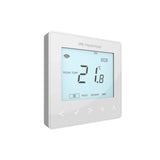
- A WiFi thermostat per zone. The Heatmiser neoStat WiFi joins your router directly, no hub needed, which suits a small property with one or two zones.
- A hub system. Heatmiser neo thermostats, wired neoStat or wireless neoAir, pair with a neoHub connected to the router. One hub runs every zone in the house through the Heatmiser Neo app.
The app is the part that matters for a second home. Heatmiser's Neo app manages the heating from any location, supports multiple locations so you can switch between your main house and the holiday home in one place, offers room-by-room geolocation rules, and needs no subscription. Wireless neoAir stats also make retrofit easy in a stone cottage where chasing cable is unwelcome, see our guide to wired vs wireless UFH thermostats.
Two practical conditions: the property needs always-on broadband (the hub wires to the router), and the heat source must be left enabled, since no app can start a boiler that is switched off at the wall.
What temperature should I leave an empty holiday home at?
Hold it just warm enough to protect the building and the plumbing, not comfortable. On Heatmiser neo thermostats that is frost mode: the thermostat ignores its normal schedule and only heats if the room falls to the frost setting, which defaults to 12°C and can be set anywhere from 7 to 17°C.
| Frost setting | Suits | Trade-off |
|---|---|---|
| 7 to 10°C | Well-insulated, modern property, short gaps | Lowest running cost; slower recovery; colder fabric |
| 12°C (default) | Most second homes over winter | Balanced protection and cost |
| 15 to 17°C | Older, damp-prone buildings; frequent lets | Costs more; house recovers quickly for arrivals |
Pick the higher end for buildings that suffer condensation or damp when left cold, and check your buildings insurance: many policies set conditions on heating or draining an unoccupied property in winter, and the policy wording beats any rule of thumb.
How does holiday mode work?
Holiday mode is frost protection with a calendar. On a Heatmiser neo thermostat in thermostat mode, it lowers the set temperature to your frost setting and holds it for the length of the holiday, then returns to the normal programme automatically when you are back, so the house is not heated to comfort for weeks by a forgotten schedule, and you do not come home to a cold house either.
For a holiday home the logic flips: use holiday mode at the second home to cover the weeks between visits, with the return date set to the day before you next arrive. The heating then wakes itself up and the house is warm when you get there, with no motorway-services app session needed. On thermostats running as time clocks, for hot water for example, holiday mode keeps the timed output off until the end date in the same way.
How long before arrival should the heating start?
Longer than you think, because UFH heats the building, not just the air. A thick screed slab starting from 12°C in midwinter can take many hours to bring the house to comfort, and the fabric of a stone cottage takes longer still. Overlay and timber systems respond faster, screed is slowest; our guide to UFH warm-up times explains what drives it.
- Screeded floors: start the evening before, or set holiday mode's return date a day early.
- Overlay, routed board and timber systems: the morning of arrival is usually enough.
- Electric UFH in a bathroom: an hour or two ahead covers most build-ups.
This is also why leaving the house at 7°C rather than 12°C is not free: the saving while away is partly spent on a longer, harder recovery, and the house arrives at comfort later.
How do I protect the system itself over winter?
Frost mode protects the rooms the thermostats can see. The system needs three more layers of protection for the places and failures they cannot:
- Treat the water. Inhibitor belongs in every system; where pipework runs through genuinely unheated spaces, or the property may stand cold, a heat-transfer antifreeze gives protection that does not depend on power or boilers. See inhibitor, biocide and antifreeze.
- Plan for power cuts. A rural second home can lose power for days with nobody there, and every electronic frost stat dies with it. Our guide to frost protection and power cuts covers the options, and a smart system at least tells you it has gone offline, which is itself an alarm worth having.
- Deal with the rest of the plumbing. The UFH is usually the most frost-resistant part of the house; the cold feed to a basin in an unheated porch is not. Many owners turn off the stopcock when leaving, and insurers may require it or full draining for longer winter shutdowns, so again, check the policy.
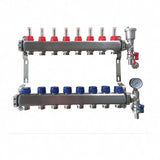
Before each winter, run the system, check the manifold pressure is at its normal cold reading, and glance at the gauge remotely if your boiler reports it, a slow pressure loss left alone for three months becomes a boiler lockout in January.
Is electric UFH better for a property used occasionally?
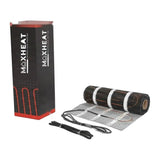
For small areas, often yes. An electric mat in a bathroom or a small overlay-boarded cottage heats quickly, has no water to freeze, and pairs with the same remote control (a neoStat-e on a hub, or a WiFi electric thermostat). The trade-off is running cost per unit of heat: electricity costs 26.32p/kWh against 7.97p/kWh for gas under the October 2026 price cap, and a holiday home on electric heating throughout will feel that in a cold snap, even at a 12°C hold.
A sensible split for many second homes: water UFH or other wet heating for the main spaces, electric mats for bathrooms, and everything on one app. For whole-property comparisons, see water vs electric underfloor heating.
What about holiday lets and guests?
Remote control earns its keep twice over in a let. You can warm the property for each arrival without a key-holder visit, drop it to frost the morning after checkout, and see at a glance that the heating is behaving between bookings. Guests meanwhile get simple thermostats on the wall rather than instructions about boilers.
Set schedules and sensible maximums before the season rather than negotiating by message during it, and if the property is let long-term rather than as holidays, different rules apply, see our guide for landlords and rental property. For changeover-day cleaning crews, a simple boost is friendlier than app access.
Free design tool: fitting out a second home? Design your UFH system yourself in 3 minutes with MaxHeatUFH ProLoop and get an instant quick design and quote. Start your design
Frequently asked questions
Can I control my underfloor heating from my phone when I am away?
Yes. A WiFi thermostat, or neo thermostats paired to a neoHub on the property's broadband, give full control of schedules, temperatures and frost settings from the app wherever you are, with no subscription.
What temperature stops pipes freezing in an empty house?
Heatmiser neo thermostats default frost protection to 12°C, adjustable from 7 to 17°C. Remember the thermostat protects the rooms it heats; pipework in unheated spaces needs insulation, antifreeze or draining down, and your insurer may specify a minimum.
Does holiday mode turn the heating off completely?
No. In thermostat mode it holds your frost protection temperature for the length of the holiday, then resumes the normal programme automatically at the return date, so the fabric and plumbing stay protected throughout.
Do I need internet at the holiday home?
For remote control, yes: the neoHub or WiFi thermostat needs an always-on connection at the property. Without broadband, the thermostats still run their schedules and frost protection locally; you just cannot see or change them remotely.
Will underfloor heating be warm when I arrive on a Friday night?
Only if it started early. Screeded UFH needs to be brought up from its holiday hold the day before; set holiday mode's return date accordingly, or start it from the app before you travel. Overlay and electric systems can be left to the day itself.
Is it cheaper to turn the heating off completely between visits?
It saves energy while off, but a stone-cold building takes a long, expensive recovery, risks condensation and damp, and leaves the plumbing unprotected in a freeze. A low frost hold is the usual compromise, and many insurance policies require it or full draining in winter.
Can one app run two houses?
Yes. The Heatmiser Neo app supports multiple locations, so your main home and the holiday home sit in one app and you switch between them.
Sources: Heatmiser FAQ: frost mode on the neoStat, Heatmiser FAQ: holiday mode, Heatmiser Neo app (App Store listing), Ofgem energy price cap
Products in this guide
Watch how each part works and how to fit it, and download its data sheet and install manual.


Every data sheet and manual: Product Library · All videos: MaxHeatUFH on YouTube

Design it in MaxHeatUFH ProLoop
Add your rooms, choose screed, overlay, joisted or electric, and get a free quick design and full kit list with prices.


