



Heatmiser hold, away and holiday modes explained
What Hold, Away, Away Until (Holiday), Standby and frost protection do on Heatmiser neoStat and neoAir thermostats, how to set and cancel each from the thermostat or neoApp, and which to use with underfloor heating.
Short answer: Hold overrides the programme for a set number of hours: you pick a temperature and a duration, and the thermostat returns to its schedule when the time runs out. Away (in the neoApp) drops the whole system to a low Away temperature, either permanently until you cancel it or until a return date and time you set. Holiday is the older name for the timed version: on the thermostat itself you set an end date and the room is held at the frost setting, 12°C by default, until you get back.
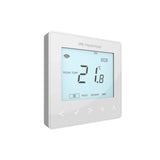
Heatmiser's neo thermostats, neoStat, neoAir and the neoStat-e for electric floors, all run a weekly programme of times and temperatures. Hold, away and holiday are the three ways to step outside that programme without rewriting it, and with underfloor heating they matter more than with radiators, because a slow-response floor rewards planning ahead rather than switching on and off.
This guide explains what each mode does, how to set and cancel it on the thermostat and in the neoApp, and which one to use for a weekend away, a long holiday or just an evening in the cold snap. Every step comes from Heatmiser's own manuals and support pages. If your thermostat is not responding the way these steps describe, start with our neoStat troubleshooting guide.
What does Hold do on a Heatmiser thermostat?
Hold keeps one zone at a temperature you choose for a duration you choose, then hands control back to the programme. Nothing in the schedule changes. On the thermostat:
- Scroll to HOLD on the display.
- Set the duration in hours and minutes.
- Set the hold temperature and confirm.
The display shows HOLD LEFT with the time remaining, counting down. To cancel early, highlight HOLD, press, then press again on CANCEL. In the neoApp, a Hold indicator appears on the zone whenever a hold is active or you have nudged the temperature away from its programmed set point, and pressing Auto returns the zone to its times and temperatures.
Hold is the right tool for one-off changes: guests staying late, an afternoon working from home, a poorly child's bedroom. Because it ends by itself, there is no risk of leaving the heating turned up for a week. On a thermostat running in Mode 3, the same menu gives a hot water boost: select TIMER, set a duration such as 02:00, and the hot water runs for that period.
What does Away mode do in the neoApp?
Away puts every heating zone on the hub into a low-energy state at once, and it comes in two forms in the neoApp:
- Permanently Away: for when you do not know when you will return. The system stays at the Away temperature until you cancel it.
- Away Until: you set a return date and time, and the system reverts to its programmes automatically. Heatmiser previously called this Holiday in the app.
In both, the thermostats maintain the Away temperature rather than switching the heating off entirely, so the house cannot drift towards freezing. Heatmiser's FAQ notes that Away turns off all heating and hot water demand while any neoPlugs you own keep working normally, useful if a plug runs a lamp on a security schedule.
The related Standby state does the same job for a single zone: it holds the Away temperature, which defaults to 12°C and adjusts between 7 and 17°C. With a neoHub G3 you can set all of this from anywhere, which is the main reason to add a hub to smart thermostat control of UFH.
How do you set Holiday on the thermostat itself?
No hub? The thermostat has its own holiday feature. On a neoStat or neoAir:
- Scroll to HOLIDAY on the display.
- Set the end date and time of the holiday and confirm.
- The holiday period starts immediately.
In thermostat mode the room is then held at the frost temperature. In timer mode the output simply stays off for the period. When the end date arrives, the normal programme resumes, so the house is warming up again as you walk in. To cancel early, highlight HOLIDAY, press, and confirm CANCEL.
Set the holiday on every thermostat if the system has no hub, because each neoStat only controls its own zone. On a hub system, use Away Until instead and one action covers the whole house.
What temperature does the house sit at while you are away?
The frost setting, unless you change it. The default is 12°C, adjustable between 7 and 17°C in the thermostat's feature menu, and the heating only fires if the room falls below that figure. The same range applies to the Away temperature on a hub system.
| Mode | Where you set it | What it holds | Ends |
|---|---|---|---|
| Hold | Thermostat or app | Your chosen temperature, one zone | After the set hours |
| Standby / frost | Thermostat or app | Frost or Away temperature, one zone | When you cancel |
| Away (permanent) | neoApp | Away temperature, whole system | When you cancel |
| Away Until / Holiday | neoApp or thermostat | Away or frost temperature, whole system or zone | At the return date |
For a winter trip, 12°C is a sensible floor: it protects pipework and keeps the fabric of the house from getting cold enough to cause condensation, without paying to heat empty rooms. Our guide to frost protection and power cuts covers what else to check before leaving a UFH system in an empty house.
Should you use these modes instead of turning UFH off?
Yes, for anything shorter than a season. A screeded underfloor heating floor stores a lot of heat and takes a long time to recover from cold, so letting the house fall right off and reheating from scratch costs comfort and, in a slow system, can cost more energy than a sensible setback. Away and holiday keep the system within reach of its normal temperatures.
Heatmiser's app also offers Location Based Control: geolocation that uses your phone's position to trigger a recipe when you leave or arrive. With several users, the last person to leave triggers the Leave recipe and the first to return triggers the Return recipe, which automates the short, everyday version of Away. For planned daily drops, programmed setbacks do the same job better on UFH: see UFH setback schedules. For the long warm-weather break, our guide to switching UFH off for summer covers the end-of-season routine.
Which Heatmiser thermostats have these modes?
The whole neo range follows the same pattern. The neoStat V3 and neoAir carry hold, frost and holiday on the thermostat, and gain Away, Away Until, profiles and geolocation when connected to a neoHub. The neoStat WiFi gives app control of a single zone without a hub. The neoStat-e does the same for electric floors.
App profiles are worth knowing about on larger systems: a profile is a stored set of times and temperatures that can apply to several rooms at once, stored on the neoHub, so editing one profile updates every thermostat using it. That makes seasonal changes, and coming back from Away, a one-step job across the house.
Products for this job
- Heatmiser neoStat V3 Programmable Smart Thermostat
- Heatmiser neoAir Wireless Smart Thermostat
- Heatmiser neoHub G3
- Heatmiser neoStat WiFi
- Heatmiser neoStat-e for electric floors
Design your UFH system yourself in 3 minutes with MaxHeatUFH ProLoop and get an instant quick design and quote. Start your design
Frequently asked questions
What is the difference between Hold and Away on Heatmiser neo?
Hold raises or lowers one zone to a chosen temperature for a set number of hours, then the programme resumes. Away drops the whole system to the low Away temperature until you cancel it or until a return date you set.
Where has Holiday mode gone in the neoApp?
It was renamed. Heatmiser's Away feature has two options: Permanently Away, and Away Until, which is the old Holiday: you set a return date and time and the system reverts automatically.
What temperature does frost protection hold?
12°C by default, adjustable between 7 and 17°C in the thermostat's feature menu. The heating only runs if the room falls below that setting.
Does Away mode turn off hot water too?
Yes. Heatmiser's FAQ says Away turns off all heating and hot water, while any neoPlugs continue to work normally.
How do I cancel a Hold early?
On the thermostat, highlight HOLD, press, then press again on CANCEL. In the neoApp, press Auto on the zone and it returns to its programmed times and temperatures.
Can I set a holiday without a neoHub?
Yes. Each neoStat and neoAir has its own holiday feature: set the end date and time on the thermostat and it holds the frost temperature until then. Without a hub you need to set it on each thermostat.
Should I use Away mode every day when I go to work?
Geolocation or a programmed setback suits daily absences better on underfloor heating, because the floor responds slowly. Keep Away for genuinely empty days, and use lower programmed temperatures for the daily routine.
Sources: Heatmiser neoAir manual (hold, holiday, frost), Heatmiser neoApp feature showcase (Away, standby, geolocation, profiles), Heatmiser FAQ: Away mode, Heatmiser FAQ: neoStat operating tips
Products in this guide
Watch how each part works and how to fit it, and download its data sheet and install manual.


Every data sheet and manual: Product Library · All videos: MaxHeatUFH on YouTube

Design it in MaxHeatUFH ProLoop
Add your rooms, choose screed, overlay, joisted or electric, and get a free quick design and full kit list with prices.


